Why BusinessSensor

Double-entry accounting built into the core, not bolted on

Most business software records sales and generates a report that looks like accounting. BusinessSensor posts every transaction to a real double-entry ledger as it happens — which is why the numbers reconcile.

The difference between a report and a ledger

A sales report tells you what was sold. A ledger tells you what happened to the business: which account was debited, which was credited, and whether the two sides agree. Software that only keeps a sales table has to reconstruct accounting afterwards, and reconstruction is where the discrepancies come from — a voided sale that never reversed, a refund that hit revenue but not cash, a payment allocated to the wrong invoice.

Posting happens at the database, not in the application

In BusinessSensor, posting to the ledger is performed by the database itself when a transaction is written. That matters for a specific reason: it means a transaction cannot exist without its ledger entries. There is no code path — no import, no correction screen, no integration — that can create a sale which never reached the accounts.

  • Every invoice, receipt, payment, refund and stock movement posts as it is written
  • Reversals post as reversals, so the audit trail shows what happened rather than hiding it
  • The trial balance is derived from the same rows that produced the operational reports

What you get from it

Because the ledger is the primary record, the financial statements are not a monthly rebuild. Aged receivables reflect this morning’s payments. Cost of goods sold reflects the batch that actually left the shelf. When an auditor asks how a figure was arrived at, the answer is a list of postings rather than a spreadsheet.

  • IFRS-aligned financial statements: trial balance, profit and loss, balance sheet, cash flow
  • Fiscal year and period close, with a controlled cut-off
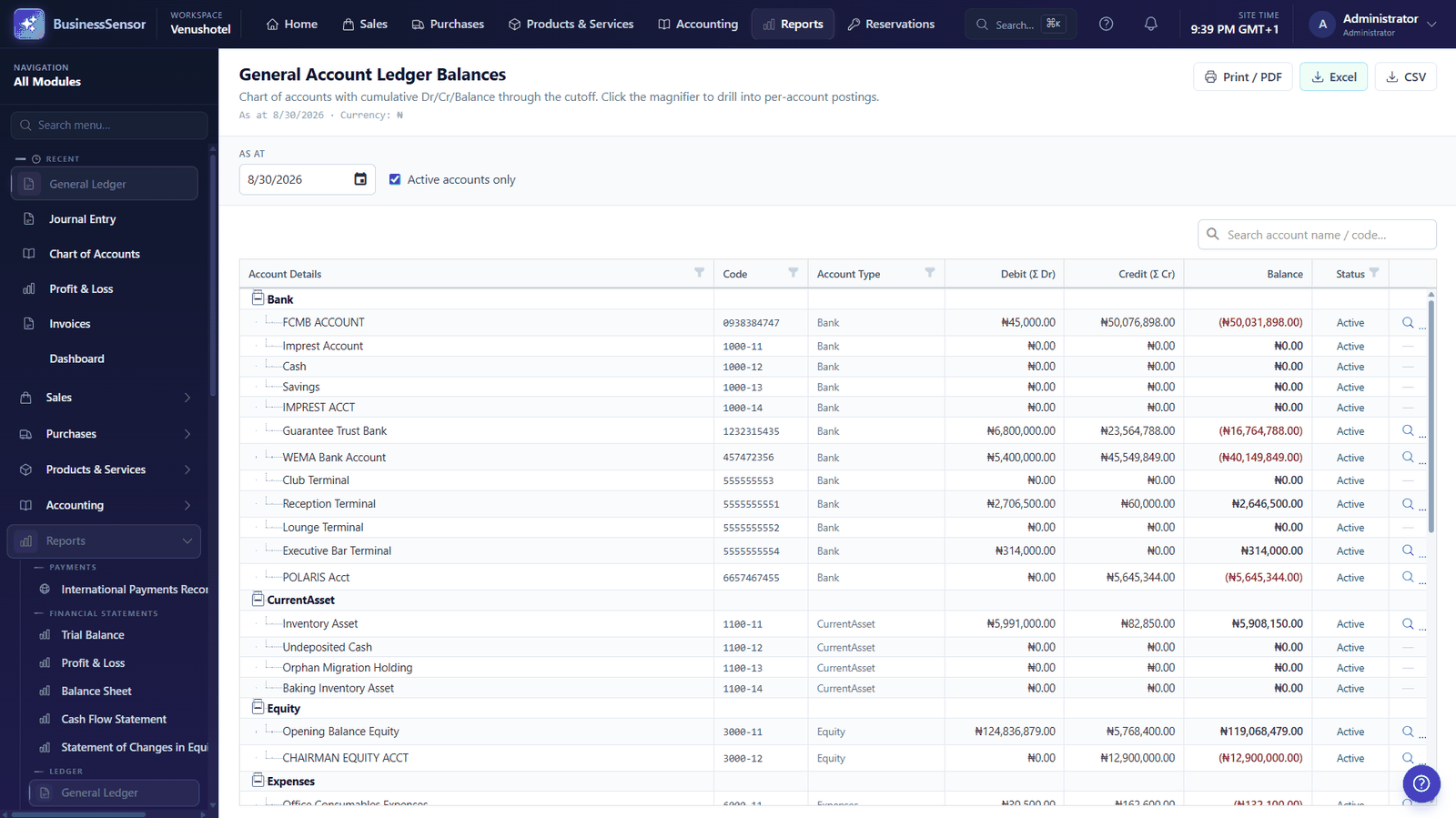
  • Full drill-down from any figure to the transactions behind it
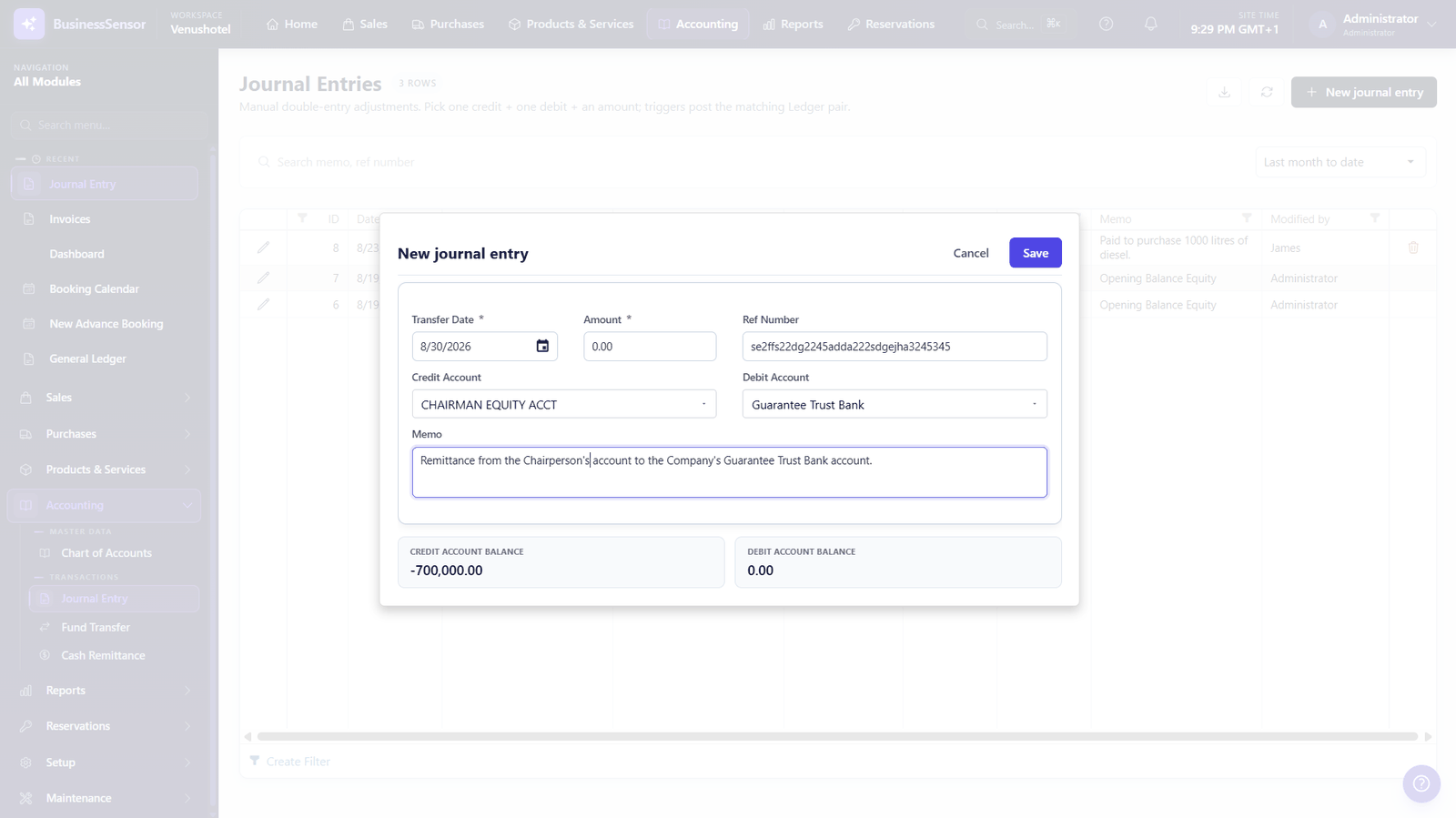
  • Manual journals where you need them, posted through the same ledger

It applies to every module

The ledger is shared. A hotel folio, a pharmacy dispensing, a supermarket till and a manufacturing work order all post into the same chart of accounts. That is what makes it possible to run several operations in one business without keeping several sets of books.
Take this to any demo

Ask any system you are considering to show you who deleted a receipt last Tuesday.

The answer tells you what kind of system it is. Most differences in a set of books are mistakes rather than theft, and a mistake you can trace to a person and a moment is corrected in ten minutes instead of argued about for a week. When something worse has happened, the same record is what turns a suspicion into something you can act on.

The general ledger day book listing posted transactions with their debit and credit entries
Every figure drills down to the postings behind it
The journal entry automatically created by an operational transaction, showing both sides of the posting
The journal entry a transaction created, on screen

Common questions

Do I need an accountant to use it?

To operate it, no — the front desk, till and warehouse screens are task-based and do not ask the operator about debits and credits. To set up your chart of accounts and interpret the financial statements, an accountant is worth involving, as with any accounting system.

Can I export to my existing accounting package?

The financial statements and ledger detail can be exported for use elsewhere. Most customers find they no longer need a separate package, since the accounting is the system rather than a downstream copy of it.

What happens if someone makes a mistake?

Corrections post as reversing entries rather than by editing history, so the audit trail shows both the original transaction and the correction. Changes are recorded in the audit log against the user who made them.

Does it follow IFRS?

The financial statements are IFRS-aligned in structure and the ledger supports the fiscal periods and controlled close that IFRS reporting assumes. Your own accounting policies and any local statutory presentation remain yours to configure and to sign off.

See it running on your own numbers

Book a walkthrough and we will show you the system doing the job you actually need it to do.