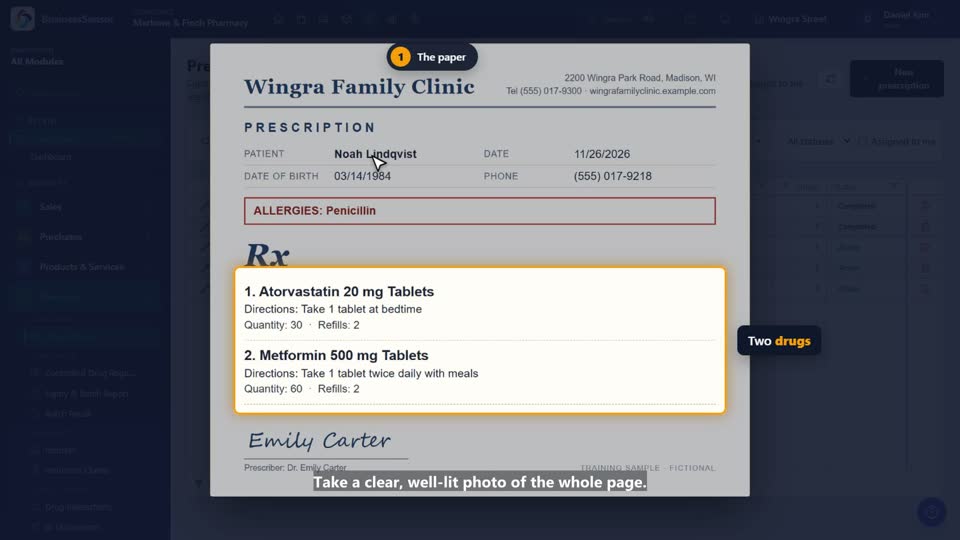
A new patient from a paper prescription
At the pharmacy counter · 1 min 49 s · Video 65 of 135 in the POS ERP book
Photograph a paper prescription: the assistant reads the patient, the allergies and the drugs, you register the patient and check the lines before saving.
From the guide: New patient intake — scan & register
When you start a new prescription, the intake wizard helps you get the patient onto the record fast: scan the paper prescription, let the assistant read the patient's name and allergies, find them if they already exist, and register them in a few taps if they don't. The drugs read from the same scan are dropped straight onto the prescription for you to check.
It works just as well without a scan — you can skip straight to searching for or registering the patient by hand.
Once a patient is selected on a prescription, a Patient allergies box appears on the Details tab (one allergy per line). Use it any time — first visit or years later — to record or correct what a patient reacts to:
Do it in your own trial
45 days free, no card needed — with a practice company to try every step safely.
Start free trialAlready a customer?
Also in these courses
Learn it by doing it
Start your free trial and follow this lesson in the practice company. 45 days, no card needed.